
🟢 System Safety Level: Normal | Monitoring: Active
C24 Club Safety Center
Core Mission: At C24 Club, we believe that digital connection should never come at the cost of personal security. While random video chat platforms offer unprecedented social freedom, they also present specific risks regarding privacy, data exposure, and bad actors.
This document serves as our official Safety Framework. It is designed to equip users with the technical and behavioral tools necessary to navigate the “social discovery” ecosystem safely.
We do not simply list applications; we advocate for a “Defense-First” approach to video chat. Whether you are using established platforms or emerging alternatives, the protocols outlined below ranging from VPN encryption standards to anti-sextortion tactics are essential for maintaining your anonymity and digital wellbeing.
Please review these guidelines before launching any external application listed on our site.
⛔ CRITICAL WARNINGS To Be Aware Of Online!
⛔ 1. CRITICAL WARNING: THE “MIGRATION” TRAP.
Do not agree to move the conversation to Instagram, Snapchat, or WhatsApp. Scammers use a tactic called “Platform Migration” to move you from an anonymous app to a social network where your real identity, friend list, and location are visible. Once they have this data, they can leverage it for blackmail.
Rule: If a match asks for your socials within the first 5 minutes, it is a targeted attack. Disconnect immediately.
⛔ 2. EXTREME RISK: Know the “Kill Switch” (Sextortion Defense)

If someone threatens to release your photos unless you pay, do not pay. Paying never stops the demands. Instead, immediately use StopNCII.org, a free tool that hashes your images to prevent them from being uploaded to Facebook, Instagram, and TikTok.
Another option is to report this to your local police department.
If someone tell you to do something on a video call, do not as they may be recording trying to use something against you. Never do something you wouldn’t normally do even if the call is private and encrypted. Simply click next and find someone new to chat with or close the application!
⛔ 3. HIGH RISK: THE “PRE-RECORDED” LOOP.
Be skeptical of high-quality video that doesn’t respond to you. Many bad actors use “Virtual Cameras” to play a pre-recorded video of an attractive person to lower your guard.
Test: Ask the user to perform a specific, random action (e.g., “touch your ear” or “hold up three fingers”). If they ignore the request or say “I can’t hear you,” it is likely a bot recording your video feed.
✅ Stay Safe Online – Best Practices On Your End!
✅ 2. DEFENSIVE TACTIC: THE “3-SECOND” SHIELD
Do not show your face immediately upon connection. Modern “AI Skimming” bots can capture your face and generate Deepfakes in seconds.
Action: Cover your camera or point it at a blank wall for the first 3 seconds of every match. Verify the other person is real and the environment is safe before revealing yourself.
✅ 1. STANDARD PROTOCOL: IP MASKING (VPN)
Never connect to a Peer-to-Peer (P2P) video service without a VPN. Most random chat apps connect you directly to the stranger’s device. This exposes your IP address, which reveals your City, Zip Code, and Internet Service Provider.
Action: Enable a trusted VPN to route your traffic through a neutral server before opening any video chat application.
✅ 3. The “Clean Room” Environment Protocol: Physical Security.
Before initiating a connection, users must sanitize their physical environment to prevent OSINT (Open Source Intelligence) gathering.
Visual Sanitization: Remove all identifiable markers from the camera’s field of view. This includes diplomas, family photos, mail with visible addresses, and window views of recognizable landmarks or street signs.
Audio Sanitization: Ensure no background noise (TV news, family conversations) can reveal your location or identity.
✅ WHAT C24CLUB IMPLEMENTS IN VIDEO CHAT TO KEEP USERS SAFE!
1. Real-Time Content Masking (AI-Driven) Status: ✅Active
We have deployed a client-side Computer Vision layer that analyzes video frames in milliseconds before they are rendered to the user.
Heuristic Detection: Our system scans for explicit content, nudity, or violent imagery with near-zero latency.
Auto-Obfuscation: Upon detecting a policy violation, the video feed is immediately covered with a “Gaussian Blur” filter. This prevents the user from being exposed to the visual content while our system flags the offender’s IP address & quickly bans the user.
2. The “Pre-Blur” Connection Protocol Status: ✅Active
To eliminate “flash exposure” (seeing unwanted content the instant a match connects), we have restructured the connection handshake.
Default State: All incoming video streams initiate in a 100% blurred state.
Consensual Reveal: The video feed only unblurs once the connection is stable and the user explicitly interacts with the interface (or after a 3-second safety timer). This puts the control of the visual experience back in the hands of the user.
3. High-Velocity Reporting & Device Ban Status: ✅Active
We have moved beyond simple “account banning” (which is easily bypassed). Our updated reporting pipeline utilizes Device Fingerprinting.
One-Click Triage: When a user clicks “Report,” the last 10 seconds of the offender’s connection data (metadata only) is preserved for review.
Hardware-Level Ban: Validated reports result in a ban linked to the device’s hardware ID, preventing the bad actor from simply creating a new email to return to the platform.
🚨 HOW TO REPORT A USER?
Report User During VIdeo Calls.
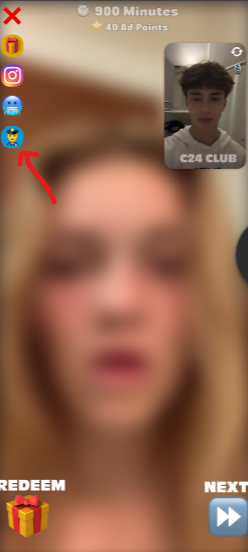
To Report a user you are connected to, simply click the blue police icon at the top right or left corner of the screen depending on device. Here’s an image example.
After submission we will move swiftely in getting the matter resolved.
Report User You Previously Connected To.
If the user skipped you or you forgot to report them, you can simply put the date you remember connecting with them and the email you used to sign up to c24club.com in the form below.
We will investigate the matter and try our best to resolve the matter.
Remember the best plan of action is click “NEXT”.
For additional help email: [email protected]
Now that you are knowledgeable about how to stay safe on video chats. Start chatting now!
Written by: C24 Safety Team